When you invest in a mutual fund, your units have to be stored somewhere. Most investors never think about this — the app just works, and the money goes in. But the choice of where your units are held affects your costs, your flexibility, and what you can do with your investment down the line.
There are two modes: SOA (Statement of Account) and Demat. SOA is the traditional, default mode — your units are held directly with the respective AMC (Asset Management Company), with no broker in the middle. Demat mode stores your mutual fund units in your demat account, the same place you hold stocks and ETFs.
For most retail investors, SOA is the better choice. It is cheaper and simpler to manage. Demat has specific advantages — but only for a specific kind of investor. This guide explains both modes in plain language, compares them side by side, and helps you decide which one is right for you.
What is SOA mode?
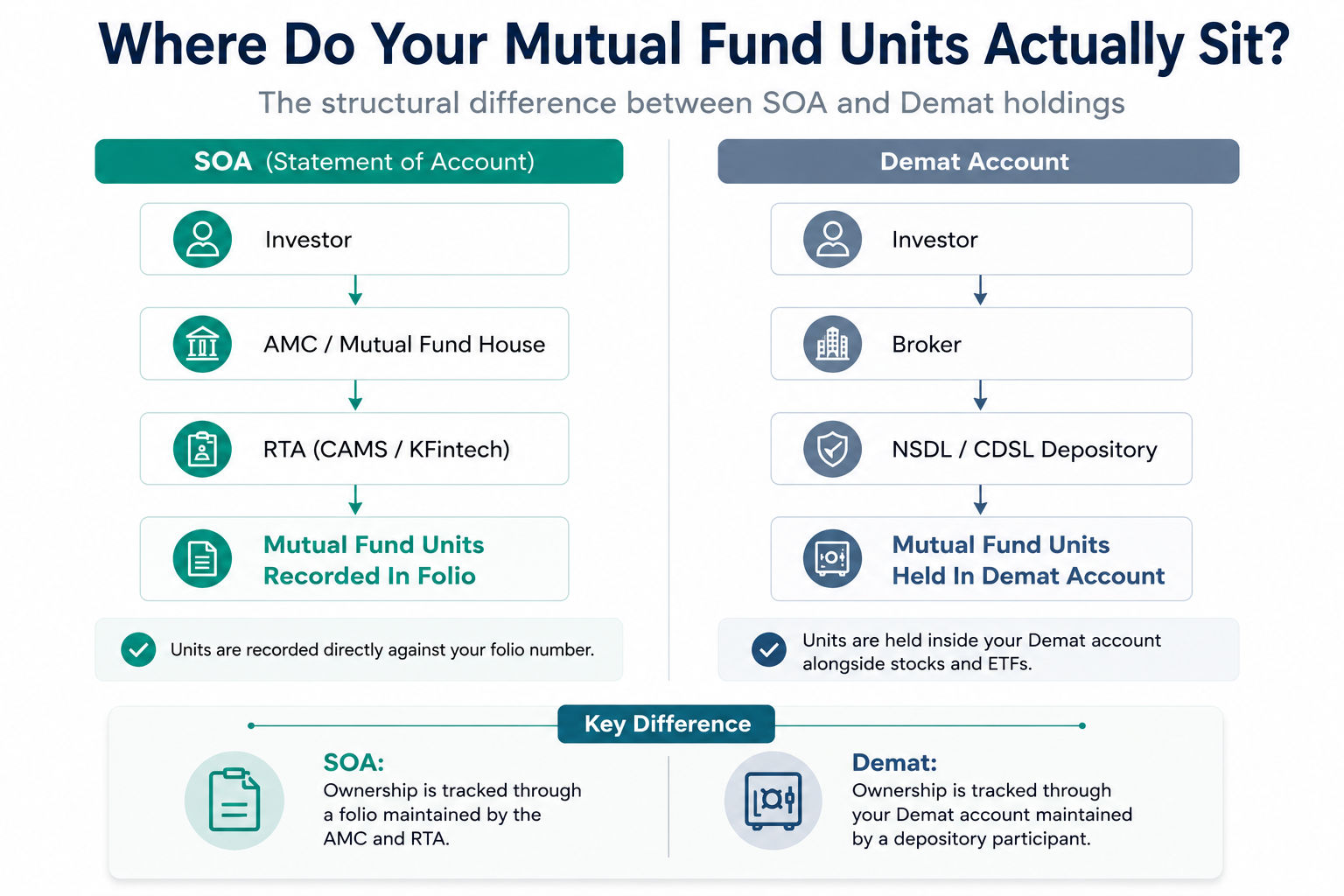
In SOA (Statement of Account) mode, mutual fund units are held with the respective AMC and serviced through RTA (Registrar and Transfer Agent). The RTA maintains your account statements and records on behalf of the AMC.
There are two RTAs in India: CAMS and KFintech. Every AMC is tied up with one of them. When you invest in a mutual fund, the RTA automatically creates a folio — think of it as your account number with that AMC. For future investments in the same AMC, you can either add to the existing folio or create a new one.
Since your units sit with the respective AMC and are serviced through RTA — not by any app or broker — there is no platform lock-in. You can track your holdings independently, switch platforms whenever you want, or invest across multiple platforms — all without any friction.
What is Demat mode?
In Demat mode, mutual fund units are still issued by the AMC, but they are routed via a stock exchange and held in your demat account by a depository. The two depositories in India are CDSL and NSDL. To invest in Demat mode, you need a demat account opened through a broker (also called a depository participant).
The main advantage is a consolidated view — your mutual funds, stocks, and ETFs all in one place. The trade-off is that your holdings are tied to your broker. Tracking them externally is harder, and switching brokers is a more involved process than it sounds.
SOA vs Demat
Portfolio, Tracking & Borrowing
| Aspect | SOA Mode | Demat Mode |
|---|---|---|
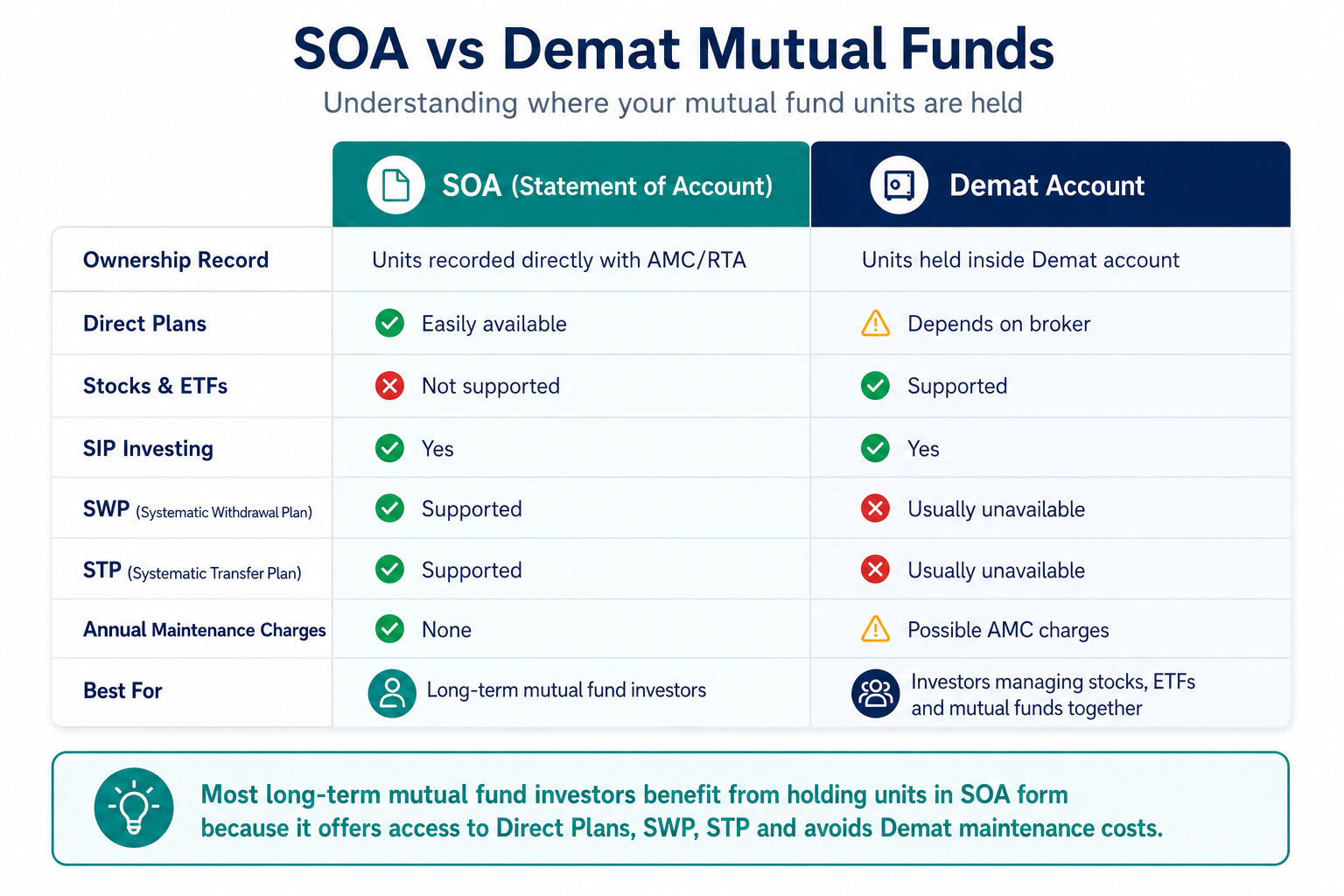
| Where units are held | With the AMC | Demat account (NSDL / CDSL) |
| Consolidated view of MF, stocks & ETFs | Possible — some brokers now offer MFs in SOA mode and show them alongside stocks in the same app. For an app-agnostic view, aggregate externally via MFCentral using your PAN | Stocks, ETFs, and bonds visible in the same demat account |
| External portfolio tracking | ✅ Consolidate via MFCentral or CAMS using PAN — pulls all AMC holdings automatically | View directly in demat account alongside stocks and bonds |
| Switching platform | ✅ Units accessible via any AMC, RTA website, or MFU — not locked to one app | Locked to your depository participant; cannot transact elsewhere. Switching brokers is a complex process |
| Loan against MF (LAMF) | ✅ Multiple lenders available — not tied to any platform or broker (smallcase, Mirae, DSP) | Pledging supported natively in demat, but largely limited to your broker’s in-house or tied-up lender — fewer third-party options |
| Best for | Most retail investors, direct plan users, cost-conscious long-term investors | Active traders, those needing margin against holdings, investors who want a single nomination across MFs and stocks |
Costs, Transactions & Transmission
| Aspect | SOA Mode | Demat Mode |
|---|---|---|
| Annual charges | ✅ None | DP charges + transaction fees may apply (₹300–₹900/year typically) |
| Who can buy | ✅ Anyone via AMC or app — no demat needed | Requires an active demat account |
| SWP / STP support | ✅ Both supported | Not supported by most brokers |
| Redemption speed | ✅ T+2 to T+3 business days — standard across all AMCs. Instant redemption available on supported liquid funds | T+2 to T+3, though DP processing adds an intermediary step. Instant redemption not supported |
| Gifting of existing investment | Cannot transfer units — must redeem and reinvest (triggers capital gains) | ✅ Off-market transfer to another demat possible as a gift — no capital gains for gifter, but giftee inherits original cost basis and holding period |
| Transmission (death / inheritance) | Separate nomination required for each AMC — complex if holding across multiple fund houses | ✅ Single nomination covers entire demat account — simpler for family |
Who should choose SOA?
SOA is the right default for most investors. Consider it if:
- You do not need a unified view of your mutual funds and stocks in a single app
- You want flexibility to take a loan against your mutual fund units
- You want instant redemption on liquid funds
- You are just starting out and want to keep things simple
Who should choose Demat?
Demat makes sense in specific situations:
- You actively trade and need instant margin against your investments
- You want a single nomination to cover your entire investment portfolio — simpler for your family in case of transmission
- You are deeply committed to a broker that only offers MFs in Demat mode, and the regular-vs-direct trade-off is acceptable to you
When to avoid Demat for mutual funds
- Your broker only offers regular plans — you end up paying a higher expense ratio with no added benefit
- You do not plan to invest a meaningful amount over time (say, less than ₹1 lakh total)
- You want instant redemption on liquid funds, or need the flexibility to switch funds quickly
- You want control over which specific units to redeem — brokers do not support multi-folio selection, so all redemptions and switches follow FIFO (first in, first out). If that matters to you, SOA gives you more control
Best apps for SOA mode
- MFCentral — backed by CAMS and KFintech jointly. The most complete platform to manage, track, and service all your SOA investments across every AMC. Best for investors who want a single authoritative view of their MF portfolio
- Kuvera (acquired by CRED) — clean, no-clutter interface built for long-term investors. Supports direct plans, goal-based investing, and has a solid tax harvesting feature. Best for DIY investors who want simplicity without sacrificing control
- Groww — popular among first-time investors for its straightforward UX. Supports direct plans in SOA mode. Best for beginners who want a quick start
- Paytm Money — good option if you are already in the Paytm ecosystem. Supports direct plans via SOA. Best for investors who prefer everything in one app
- MFU (MF Utilities) — industry-backed platform that lets you transact across all AMCs from one login. Less polished than consumer apps but highly reliable. Best for investors who want maximum AMC coverage and zero platform risk
Best apps for Demat mode
- Zerodha Coin — the most widely used platform for Demat mutual funds. Clean interface, direct plans available, integrates seamlessly with Zerodha’s stock trading. Best for existing Zerodha users who want MFs alongside their equity portfolio
- Groww — offers mutual funds in Demat mode for users with a Groww demat account. Best for investors who use Groww for stocks and want everything in one place
- Angel One — supports mutual funds in Demat mode with a unified portfolio view. Best for Angel One stock users
- Upstox — mutual funds available via Demat mode within the Upstox ecosystem. Best for Upstox traders who want to add MF exposure
For a complete breakdown of holding modes and plan structures across 20+ Indian platforms (including traditional bank brokers), check out the Mutual Fund Holding Mode Broker List.
How to convert Demat mutual funds to SOA
SEBI allows investors to convert their Demat mutual fund units to SOA mode. The process is called rematerialisation and goes through your AMC directly.
Steps:
- Download the rematerialisation request form from your AMC’s website (each AMC has its own form)
- Fill in your folio number, scheme name, number of units, and demat account details
- Submit the form to the AMC or their RTA (CAMS or KFintech) — either physically or via their online portal if supported
- The AMC will debit the units from your demat account and credit them to your SOA folio
- Processing time is typically 7–10 business days
Note: you will need to do this separately for each AMC where you hold Demat units. There is no single centralised process.
How to transfer mutual funds from SOA to Demat
Moving SOA units to Demat mode is called dematerialisation. This is done via your broker (depository participant).
Steps:
- Submit a Dematerialisation Request Form (DRF) to your broker — most brokers have this available in their app or as a downloadable form
- Attach your SOA account statement showing the units you want to convert
- Your broker submits the request to the depository (CDSL or NSDL)
- The depository coordinates with the RTA to debit the SOA folio and credit the units to your demat account
- Processing time is typically 7–15 business days
Note: once units move to Demat mode, they follow your broker’s rules — including FIFO redemption and regular plan restrictions if applicable. Confirm your broker supports direct plans before initiating this.
Conclusion
Start with SOA. It is cheaper and works well for the vast majority of investors.
The classic argument for Demat — a consolidated view of your mutual funds and stocks — no longer holds the way it used to. Several brokers now offer MFs in SOA mode within the same app, so you can get unified tracking without taking on Demat’s trade-offs. The real question when buying MFs through a broker is whether they offer direct plans or only regular plans — that is what affects your returns over time, not the SOA-vs-Demat label.
Choose Demat only if you have a specific, strong reason — margin trading, unified nomination, or a broker experience you are deeply committed to.
Still unable to decide? Use this decision tree
Start here: Do you already have a demat account and actively use it for stocks?
- No → Go with SOA. Open an account on Kuvera or MFCentral and start investing directly.
- Yes → Continue below.
Do you want your mutual funds and stocks visible in one place within your broker app?
- No → Go with SOA via an MF-focused app like Kuvera or MFCentral.
- Yes → Continue below.
Does your broker offer MFs in SOA mode? (Not sure? Check the Mutual Fund Holding Mode Broker List to verify).
- Yes → Buy MFs through your broker in SOA mode. You get the unified view without the Demat trade-offs (DP charges, FIFO redemption, no SWP/STP).
- No, only Demat → Continue below.
Does your broker offer direct plans for mutual funds in Demat mode?
- No → Go with SOA via a different app. Investing in regular plans through a broker costs you 0.5–1% extra per year in expense ratio — that compounds significantly over a decade.
- Yes → Demat is a reasonable choice for you. You get unified visibility with no hidden cost penalty.
One final check: do you need instant redemption on liquid funds, or do you actively use SWP/STP?
- Yes → Go with SOA. Demat mode does not support these features on most platforms.
- No → Either mode works. Demat is fine if unified portfolio view matters to you.
Questions people ask about SOA vs Demat mutual funds
What is SOA in mutual funds?
SOA stands for Statement of Account. It is the traditional mode of holding mutual fund units, where units are held with the respective AMC and serviced through RTA (CAMS or KFintech). You do not need a demat account. Your holdings are accessible via any AMC, RTA website, or platform like MFCentral — there is no platform lock-in.
Which is better — SOA or Demat for mutual funds?
SOA is better for most investors. It has no annual charges, supports direct plans, allows instant redemption on liquid funds, and gives you full flexibility to switch platforms. Demat makes sense only if you actively trade stocks and want a single unified view of your portfolio, or if you need to pledge units for margin trading.
Is it better to hold mutual funds in a demat account?
For most retail investors, no. The unified view that Demat offers is now largely replicable through apps like INDmoney or Tickertape, which aggregate both SOA and Demat holdings. Demat adds annual DP charges, restricts SWP/STP on most platforms, and may lock you into regular plans depending on your broker. Unless you have a specific reason, SOA is the cleaner default.
How to convert Demat mutual fund units to SOA?
This process is called rematerialisation. You submit a rematerialisation request form to the AMC (available on their website), mentioning your folio number, scheme, units, and demat account details. The AMC coordinates with the RTA to debit your demat account and credit the SOA folio. Each AMC has its own form and the process takes 7–10 business days per AMC.
How to transfer mutual funds from SOA to Demat?
This is called dematerialisation. Submit a Dematerialisation Request Form (DRF) through your broker, along with your SOA account statement. Your broker submits the request to the depository, which coordinates with the RTA to move the units. Processing typically takes 7–15 business days. Before doing this, confirm your broker supports direct plans — otherwise your expense ratio will increase once the units move to Demat mode.
This article is for educational purposes only and does not constitute investment advice. Please consult a SEBI-registered investment advisor before making financial decisions.